

Control How AI Sees Your Site
Manage robots.txt and llms.txt to control which AI bots can access your content with simple visibility modes.
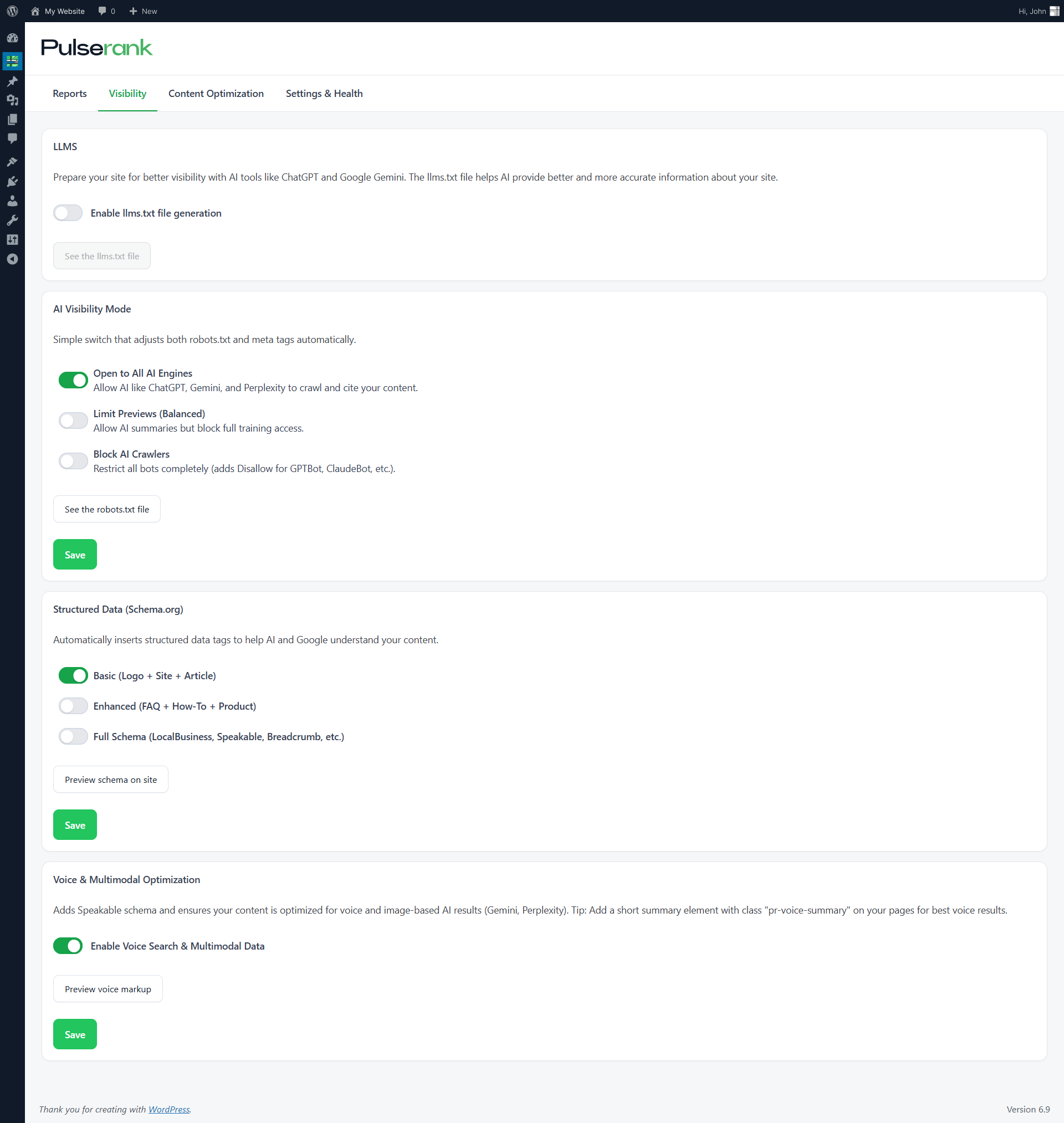
Visibility Management
Take control of your content’s visibility to AI systems.

robots.txt Mode Selector
Choose Open, Balanced, or Block mode to control AI bot access site-wide.

llms.txt Generator
Generate llms.txt with your site name, description, and contact info for AI models.

Bot Blocking
Block all AI crawlers from accessing your content in Block mode.

Preview Tools
Preview your robots.txt and llms.txt output before publishing.
Generated Files
PulseRank generates and manages these files for you.
User-agent: GPTBot
Disallow: /wp-admin/

User-agent: ChatGPT-User
Disallow: /wp-admin/

User-agent: ClaudeBot
Disallow: /wp-admin/

User-agent: Google-Extended
Disallow: /wp-admin/

User-agent: PerplexityBot
Disallow: /wp-admin/

# ... (25+ AI bots total, all with same rule)# PulseRank llms.txt
# Basic site and business metadata for AI agents.
site: https://example.com/
sitemap: https://example.com/sitemap.xml
business_name: Your Business Name
description: Your business description here
logo: https://example.com/logo.png
address: 123 Main Street, City, State
phone: +1-555-123-4567
opening_hours: Mon–Fri 09:00–17:00
contact_email: [email protected]
price_range: Moderate
url_home: https://example.com/
url_about: https://example.com/about/
url_contact: https://example.com/contact/
social_linkedin: https://linkedin.com/company/yourbusinessFrequently Asked Questions
We’ve anticipated your concerns and engineered solutions for each one.
llms.txt is an emerging standard for helping AI language models understand your website’s basic information.
Similar to robots.txt but designed specifically for AI agents, it provides structured metadata including your site name, description, contact details, key URLs, and social profiles.
When enabled, PulseRank automatically generates this file to help AI systems provide accurate information about your business.
It depends on your goals. Blocking AI crawlers prevents them from training on your content, but may reduce AI referral traffic.
PulseRank helps you make informed decisions by showing which bots visit and what traffic they generate.
Legitimate AI crawlers from major companies (OpenAI, Anthropic, Google) respect robots.txt directives. However, some lesser-known crawlers may ignore them.
PulseRank detects all visitors regardless of robots.txt compliance, giving you complete visibility into who accesses your site.
PulseRank offers three site-wide modes:
- Open: Allows all AI bots full site access
- Balanced: Restricts all AI bots from admin areas (/wp-admin/) while allowing public content crawling
- Block: Completely blocks all AI bots from your entire site
These settings apply uniformly across your site and affect 25+ major AI crawlers including GPTBot, ClaudeBot, Google-Extended, PerplexityBot, and others.
PulseRank provides “See the robots.txt file” and “See the llms.txt file” buttons in the Visibility settings, allowing you to view the live generated output.
You can also monitor bot activity in your dashboard to confirm which crawlers are accessing your site.
Stop Guessing. Start Measuring.
Join WordPress sites already using PulseRank to uncover their AI traffic and optimize for the future of search.